Canva Website Template: Build Your Online Presence
Building a professional website used to mean hiring a developer, wrestling with complex code, or spending weeks learning a new platform. For small business owners, florists, and creative entrepreneurs, this often felt like a major roadblock. The Canva Website Template changes this dynamic entirely, offering a straightforward path to a polished online presence without the technical headache. It's not about replacing custom web development for large corporations, but about providing a powerful, accessible tool for those who need to get online quickly and beautifully.
More Than Just a Pretty Layout
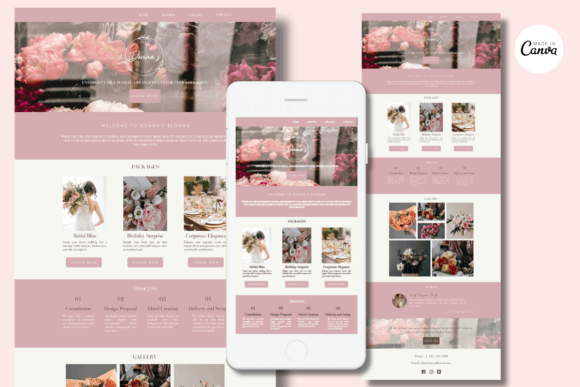
When you first open a Canva Website Template, you'll notice it's designed with visual harmony in mind. These aren't just random pages; they're cohesive brand identity starters. A template for a florist, for example, might feature soft, organic color palettes, elegant script fonts for headings, and clean sans-serif fonts for body text. The visual personality is immediately apparent—whether it's modern and minimalist, rustic and warm, or bold and contemporary. This thoughtful design approach means you're starting with a foundation that already feels professional and intentional.
The real strength lies in its practicality. Every element is built using Canva's intuitive drag-and-drop editor. You can swap placeholder images with your own product photos, adjust the color scheme to match your existing brand colors in seconds, and change fonts with a simple click. This level of easy editing empowers you to maintain full creative control. You're not just filling in blanks; you're actively shaping the site to reflect your unique voice. The included pages—like an Introduction, Gallery, Packages, and Testimonials—are strategically chosen to guide a visitor through your story, services, and social proof, creating a natural customer journey.
Practical Applications for Your Business
Where does a Canva Website Template truly shine? For service-based businesses and creatives, it's a game-changer. Imagine a wedding photographer using the Gallery page to showcase a recent event, with the Process page clearly outlining what clients can expect. A local bakery could use the Open Hours and Contact pages as a digital storefront, while a consultant might leverage the Our Commitment and Team sections to build trust. The responsive design ensures your site looks just as good on a client's phone as it does on their desktop, which is non-negotiable in today's mobile-first world.
Beyond the immediate function as a website, these templates serve as excellent design assets. The visual system you create—your chosen fonts, colors, and layout style—can be directly translated to your social media graphics, email headers, and even packaging design. This fosters the kind of consistency that strengthens brand recognition. Using a premium font pairing from the template across all your materials elevates your entire brand perception from "small hobby" to "established professional."
Getting Started and Key Considerations
Accessing your template is simple. After purchase, you receive a PDF with a direct link. Clicking it opens the template directly in your Canva account. If you don't have one, signing up is free and takes a minute. From there, customization is key. Replace every piece of placeholder text with your own copy. Upload your logo and high-quality images. Adjust the font pairing if needed—perhaps using a display font for main headings and a highly readable sans-serif font for paragraphs to ensure excellent readability.
A critical question many have is about publishing and domains. On a free Canva account, you can publish your site to a free my.canva.site subdomain. This is perfect for getting started and testing your content. Canva Pro subscribers unlock the ability to connect a custom domain (like www.yourbusiness.com), which is highly recommended for long-term professionalism and SEO optimization. While Canva handles the free hosting and basic built-in SEO fields, your content strategy—using relevant keywords in your text and image alt-text—remains your responsibility for ranking well.
Think of the Canva Website Template as your strategic starting point. It removes the initial barriers of cost and complexity, allowing you to focus on what matters: your message, your products, and your connection with your audience. It’s a practical tool for building a functional, attractive, and cohesive online home for your brand, giving you the confidence to share your work with the world.